Projects
Use this page to create and manage projects in the PRISM Studio frontend.
This guide is intentionally UI-first. Standard users should use the project forms in PRISM Studio instead of editing JSON files manually.
Open the Projects Page
Start PRISM Studio.
Open
Projectsin the top navigation.
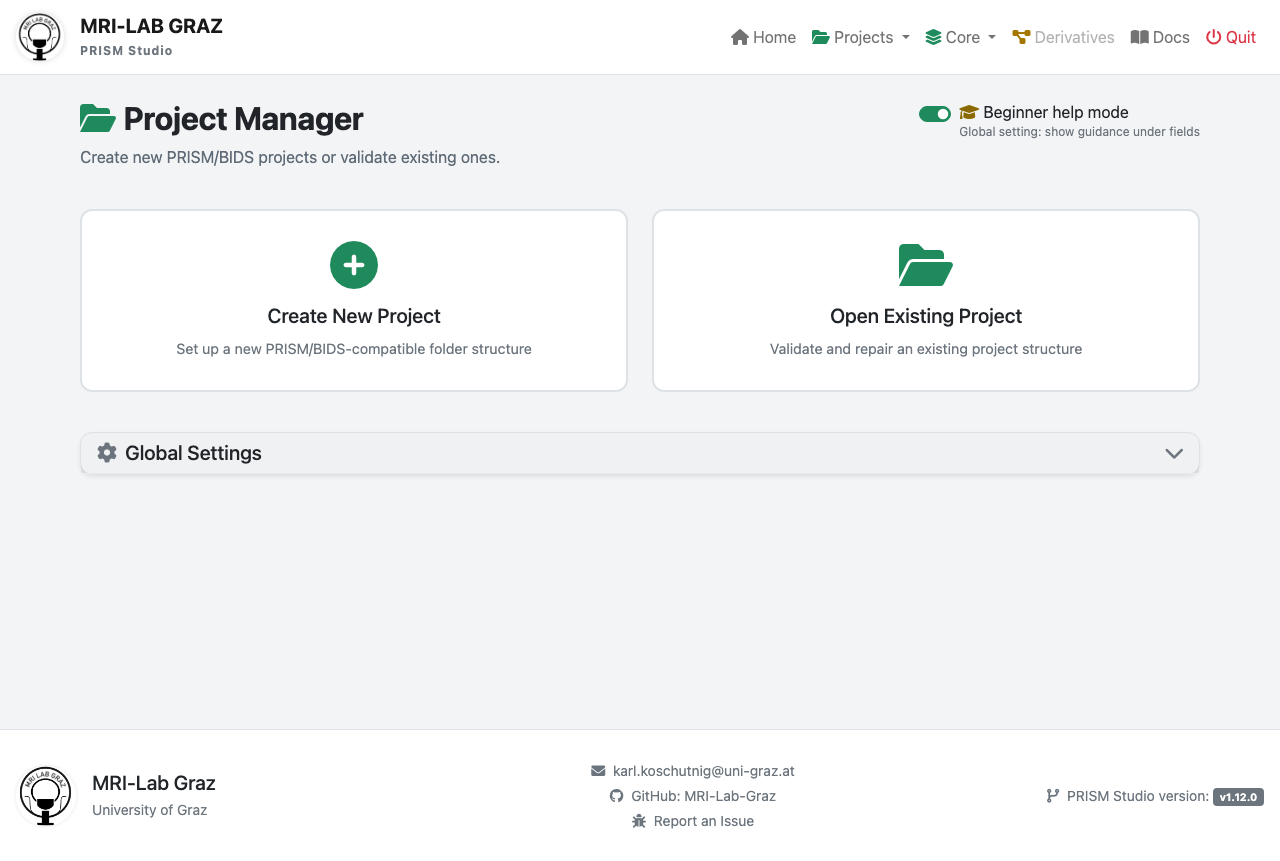
Global Overview (Project Loaded)
When a project is loaded, the Projects page provides a single overview of all project-management entry points.
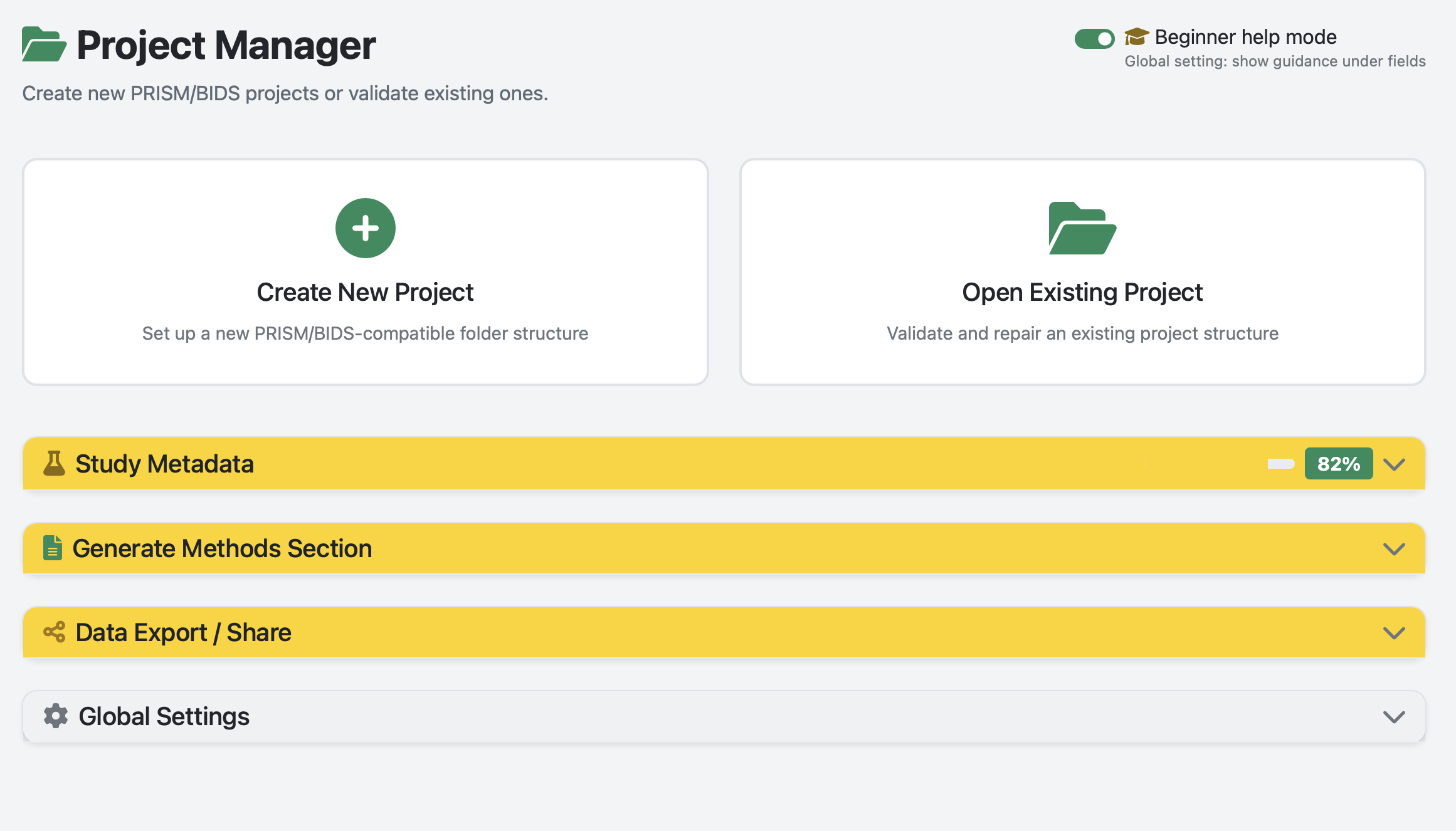
The overview includes:
Create New ProjectandOpen Existing Projectcards at the top.Top-level accordions for
Study Metadata,Generate Methods Section, andData Export / Share.Global Settingsas a separate collapsible section.Beginner help modetoggle in the page header.
Use this view as the starting point before opening specific subsections.
Create a New Project (Recommended)
Click
Create New Project.Fill the form fields:
Project Name: short, lowercase with underscores. Example:wellbeing_study.Project Location: choose the parent folder where the project folder will be created.
Confirm creation.
What to Fill In
Use clear project names that map to your study title.
Avoid spaces and special characters in folder names.
Keep one study per project folder.
What PRISM Studio Creates
PRISM Studio creates a project scaffold aligned with YODA principles and PRISM-compatible dataset organization.
my_study/
|-- dataset_description.json
|-- participants.tsv
|-- sub-001/
|-- code/
|-- analysis/
|-- project.json
`-- CITATION.cff
Open an Existing Project
Click
Open Existing Project.Select either:
the project folder, or
project.jsoninside that folder.
Verify the project is active in the UI header.
Edit Project Metadata in the Frontend
Use frontend forms for common metadata updates:
Dataset title and description
Authors and contributors
Participants metadata
Project-level settings
Avoid manual JSON editing unless you are doing advanced maintenance.
Metadata Snippet 1: Global Status
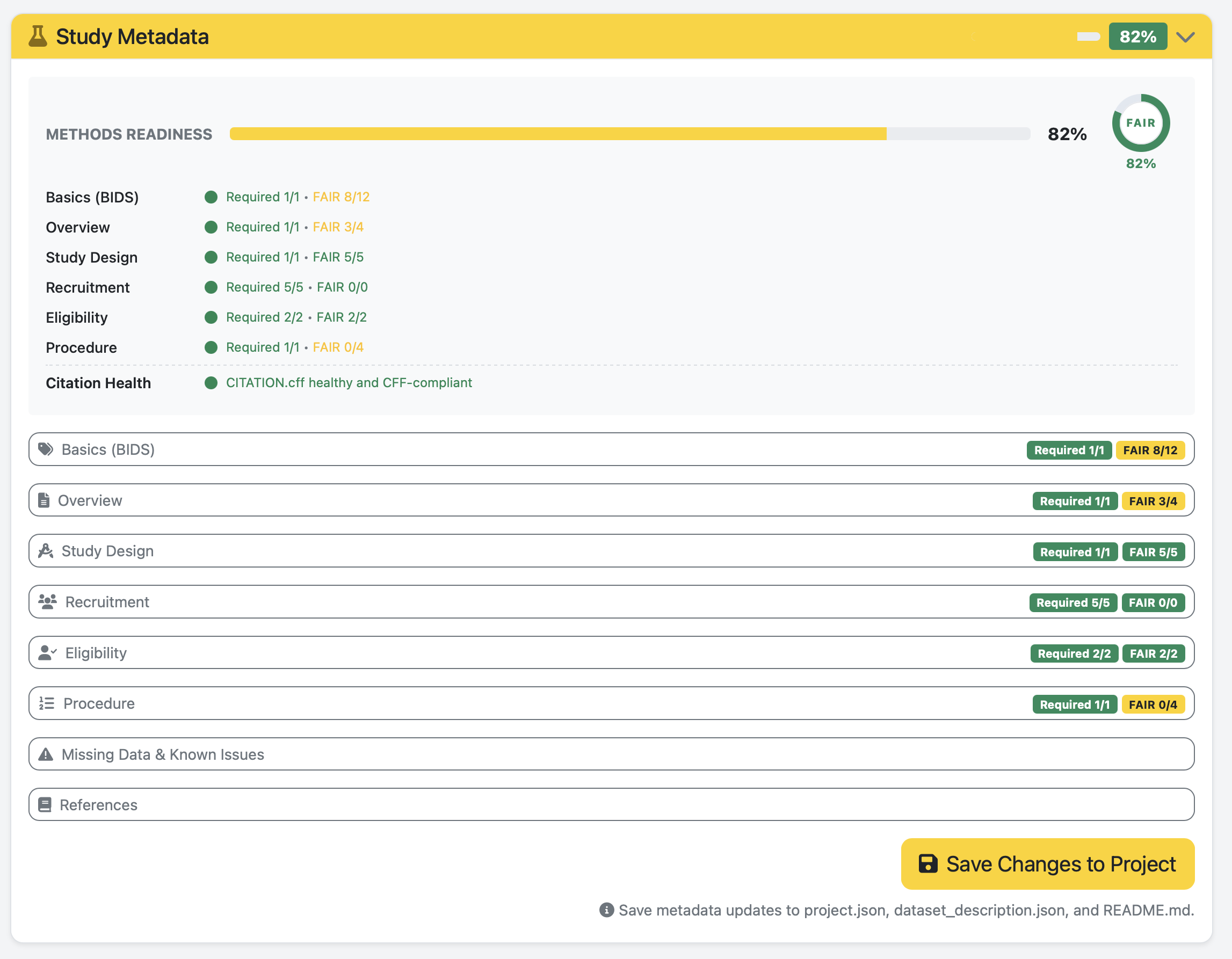
Use this screenshot to interpret project readiness at a glance:
Treat
Requiredcompletion as the release blocker for methods completeness.Use the
FAIRindicator to prioritize improvements after required fields are complete.Re-check this panel after each subsection save to verify real progress.
Metadata Snippet 2: Basics (BIDS)

Use this screenshot as the canonical reference for first-pass metadata completion.
Field intent beyond inline help:
Dataset Name: canonical study label used across BIDS metadata and citation output.Authors: maintain consistent name style to avoid citation drift.Ethics Approvals: capture committee and approval ID in publication-ready wording.Keywords: use normalized terms to improve search and reuse.Funding: set explicitYesorNo; do not leave ambiguous blanks.
Quick example:
Dataset Name: mood_regulation_study
Keywords: emotion regulation, stress, longitudinal, survey
Funding: Austrian Science Fund (FWF), P34789
Additional Metadata Subsections
Overview
Dataset Overview(required): short paragraph with goals, context, and unique value.Independent Variables: manipulated conditions.Dependent Variables: measured outcomes.Control Variables: pre-defined controls/covariates.Quality Assessment: brief QC summary or pointer to QC report.
Study Design
Study Design Type(required): select the top-level design (cross-sectional,longitudinal,RCT, etc.).Condition Type: between-subjects, within-subjects, or mixed.Type Description: extra detail (for example2x2 factorial).Blinding,Randomization,Control Condition: fill for experimental designs.
Recruitment
Method(required): recruitment channels (multi-select).Location(required): country/city entries orOnline-only recruitment.Period StartandPeriod End(required): recruitment window.Financial Compensation(required): whether participants were compensated.
Eligibility
Inclusion Criteria(required): one criterion per line.Exclusion Criteria(required): one criterion per line.Target Sample Size: planned sample size.Power Analysis: concise method and assumptions.
Procedure
Overview(required): narrative of the study flow.Informed Consent: when/how consent was captured.Quality Control: one QC measure per line.Missing Data Handling: planned handling strategy.Debriefing: how and when participants were debriefed.Additional Data Acquired: extra data not central to the current release.Notes: practical or procedural notes.
Missing Data & Known Issues
Missing Data Description: high-level summary.Missing Files (Table): one line per subject, formatSubjectID | missing content.Known Issues (Table): one line per file, formatFilename | issue.
References
References: one citation or DOI/URL per line.Prefer stable identifiers (DOI, PMID, OSF URL).
Suggested Fill Order
Use this order to move quickly from 0% to publication-ready metadata:
Complete all
REQUIREDfields inBasics (BIDS).Fill required fields in
Overview,Study Design,Recruitment,Eligibility, andProcedure.Add recommended FAIR fields (
License,Dataset Type, richer references).Add
Missing Data & Known Issuesonce data collection/QA is underway.Re-check
Methods ReadinessandCitation Health.
Recommended User Workflow
Create/open project in
Projects.Convert/import data in
Converter.Validate in
Validator.Run scoring in
Tools -> Recipes & Scoring.
Optional CLI (Advanced)
CLI is optional and intended for automation or CI.
# Validate project dataset
python prism-validator /path/to/project

# Run survey recipes
python prism_tools.py recipes survey --prism /path/to/project
For full command coverage, see CLI Reference.
Roadmap (User Feedback, 2026-03-16)
This roadmap translates recent user feedback into concrete implementation slices.
Solved in This Iteration
[x]
Open Existing Projectnow accepts both project folder andproject.jsonpath.[x] Windows picker flow improved with folder fallback and stricter
project.jsonvalidation.[x] Dead paths are removed from recent projects instead of only being hidden.
[x] Participant table loading is more robust against BOM and CSV/TSV delimiter mismatch.
[x] Project state synchronization improved across navbar and page-level project state.
[x] Startup now shows a one-time update modal when a newer PRISM Studio release is detected from the existing footer version check.
[x] Wide-to-long conversion now accepts exact session indicators anywhere in the column name, not only prefixes.
[x] Wide-to-long now has a backend CLI command with inspect-only rename preview, and web backend logging shows the exact
prism.py wide-to-longequivalent.[x] Wide-to-long web preview/convert now executes the backend
prism.py wide-to-longcommand instead of running separate in-process conversion logic.[x] Windows packaged startup no longer depends on fragile nested
cmdrelaunch command parsing.[x] Dedicated terminal relaunch decision and command generation are now centralized in a backend helper module with regression tests.
Lessions-Learned
Reuse the server-rendered release metadata for update UX; the frontend should only decide when to show the notice, not re-implement release comparison or make a second version-check request.
Wide-to-long matching logic belongs in the backend helper; the web form should only collect exact indicator strings and display what the backend matched.
If a web tool already presents a terminal-style command, implement the real backend CLI and reuse that contract in backend monitoring instead of leaving the command as UI-only text.
Once a backend CLI exists, the web route should consume its machine-readable output rather than re-implementing the same conversion path inside Flask.
Windows GUI app relaunch through nested shell wrappers is brittle; prefer one explicit shell entry with deterministic quoting and explicit environment transfer.
Startup/relaunch behavior should be validated by small pure-unit tests around command construction, not only manual packaged smoke checks.
P1 - Editing Concept / State Consistency (Next)
[ ] Introduce a single frontend project-state store used by all pages/tools.
[ ] Emit and consume one canonical project-change event (
prism-project-changed) everywhere.[ ] Remove duplicated project-path derivation logic (hidden inputs,
window.*, per-page fallbacks).[ ] Add integration tests for tool switching with an already-loaded project.
Acceptance criteria:
Switching between
Projects,Converter,Recipes,Validator, andToolsnever loses loaded project context.Menu enable/disable states are consistent after load, reload, and project switch.
Required field indicators stay stable after section reload/save cycles.
P1 - Save As / Rename / Move Project
[ ] Add backend operation to duplicate project metadata and structure to a new target path.
[ ] Add optional in-place rename operation with path safety checks.
[ ] Add optional move operation across drives/folders with conflict handling.
[ ] Preserve BIDS compatibility files and project pointers during copy/move.
Acceptance criteria:
Users can create a new similar project from an existing one without manual filesystem edits.
Cross-drive move/copy works on Windows and keeps project loadable in PRISM Studio.
Recent projects update automatically and drop stale source entries when moved.
P1 - Resume Marker for Long-Running Actions
[ ] Persist conversion/analysis run metadata (status, started_at, last_step, output_path).
[ ] Add resumable job UI with
Resume,Restart, andDiscardactions.[ ] Add explicit crash-safe write points for multi-step conversions.
Acceptance criteria:
Interrupting a run (sleep/close/restart) does not force full rerun when intermediate state exists.
Users see clear resume location and next action after returning.
P2 - Parsing Reliability / Error Transparency
[ ] Standardize tabular file ingestion helpers across all converter blueprints.
[ ] Normalize parser error messages to actionable UI hints (delimiter, encoding, missing required columns).
[ ] Add regression fixtures for malformed header, BOM, wrong delimiter, and mixed TSV/CSV naming.
Acceptance criteria:
Common
line 1 char 1parsing failures produce targeted guidance instead of generic errors.Same input file behavior across participants/survey/biometrics flows.
Lessons Learned (2026-03-16)
Shared utility code is not enough if callers still implement divergent behavior; state and flow ownership must be centralized.
Returning different path semantics (
project.jsonvs project root) creates hidden cross-tool bugs.Recent-project cleanup should be data maintenance, not only presentation filtering.
Parser robustness must be implemented once and reused, not re-implemented per blueprint.
Next Sprint Handover (Token-Light)
Use this checklist to continue in a fresh chat without reloading full history.
Goal
Finish P1 state consistency across all remaining frontend modules.
Keep Project Manager neutral on entry (no implicit autoload).
Keep Windows picker responsiveness high (
tkinterfirst).
Immediate Tasks
[x] Replace remaining direct
window.currentProjectPathreads with store-first helpers in untouched modules.[x] Add one integration-style frontend test flow: load project -> switch pages -> create mode -> recent project reload.
[x] Validate that navbar badge + menu enabled states are always event-driven (
prism-project-changed).
Verification Gate
[x] Run targeted unit tests for lifecycle, participants, picker service.
[x] Run
tests/verify_repo.pywithpath-hygieneandsystem-file-filteringchecks.[ ] Manual GUI pass on Windows: project switch, create reset, recent project click, picker latency feel.
Lessons Learned (Delta)
Clearing only form inputs is insufficient; active project context must be cleared too.
Project display name must be derived from the selected project’s metadata, not stale session state.
Theme utility overrides should honor Bootstrap opacity variables to avoid visual regressions.
Small iterative test gates between UI changes reduce backtracking significantly.